
If you’re searching for a clear, practical explanation of cloud computing architecture basics, you’re likely trying to understand how modern cloud systems actually work—beyond the buzzwords. Whether you’re building an application, exploring infrastructure options, or strengthening your technical foundation, this article is designed to give you a structured, easy-to-follow breakdown of the core components that power today’s cloud environments.
We’ll walk through the essential layers of cloud architecture, including front-end and back-end systems, virtualization, networking, storage models, and security frameworks. You’ll also learn how these components interact to deliver scalability, reliability, and performance in real-world deployments.
Our insights are grounded in ongoing analysis of emerging technologies, secure protocol development, and evolving infrastructure patterns. By focusing on both foundational principles and current best practices, this guide ensures you gain not just definitions—but a working understanding you can apply immediately.
Your Blueprint to Modern Digital Infrastructure
Cloud computing can feel like learning a new language. This guide simplifies cloud computing architecture basics so you understand how applications are built, deployed, and scaled. We break down service models, infrastructure layers, and secure protocols in plain terms. Think of the cloud as digital real estate—servers, storage, and networks you rent instead of own.
Wondering what comes next? You might ask how to choose between public, private, or hybrid setups, or how security fits in. From there, explore cost optimization, compliance requirements, and scalability planning. Each step builds confidence to evaluate vendors.
What is Cloud Computing Architecture? The Core Idea
Cloud computing architecture is the structured design of all the technology pieces—hardware, software, storage, and networking—that work together to create a cloud environment. In simple terms, it’s the blueprint that explains how data moves, where applications run, and how users connect. When people study cloud computing architecture basics, they’re learning how these components interact behind the scenes.
Why It Matters
Traditional on-premise architecture means owning physical servers and maintaining them in-house. Think of it like carving a statue from a single block of stone: solid, but hard to reshape. Cloud architecture, by contrast, is like building with LEGOs—standardized, modular blocks that snap together and scale up or down easily (much less dramatic than chiseling marble at 2 a.m.).
This modular design enables scalability (the ability to grow or shrink resources on demand), cost-efficiency (paying only for what you use), and flexibility (deploying apps from anywhere with internet access).
Key Players
The front-end is the client side—your browser or app interface. The back-end is the server side—remote data centers storing and processing information. Together, they create the seamless experience users expect (even if the complexity underneath says otherwise).
The Essential Building Blocks: Compute, Storage, and Networking
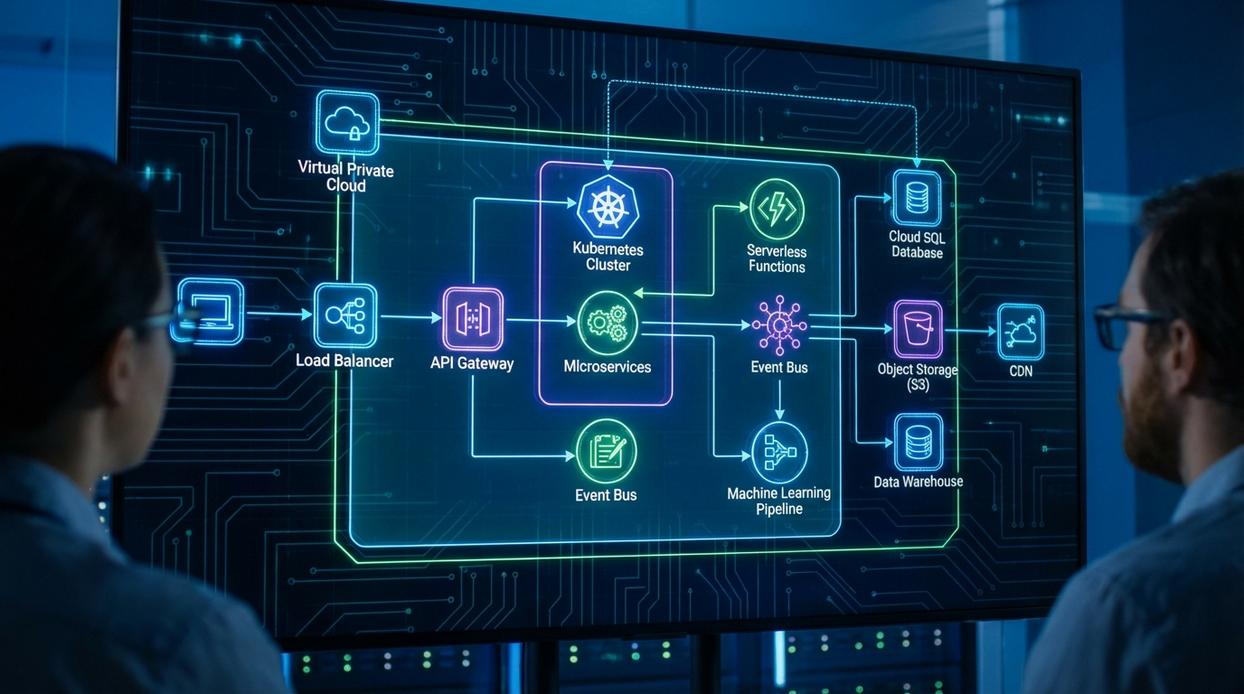
Every modern application relies on three core pillars of cloud computing architecture basics: compute, storage, and networking. Think of them as the brain, memory, and nervous system of your environment.
Compute Services (The “Brain”)
Compute is where your application “thinks.”
- Virtual Machines (VMs): Emulate full computers. Best for legacy apps that require specific operating systems. Example: Migrating a 10-year-old accounting system without rewriting it.
- Containers (Docker, Kubernetes): Lightweight packages containing code and dependencies. Ideal for microservices. Example: Running separate services for login, payments, and notifications.
- Serverless (AWS Lambda): Executes code only when triggered. Great for event-driven tasks like resizing uploaded images.
Pro tip: Start with containers for new apps—they’re portable and scale faster than traditional VMs.
Storage Services (The “Memory”)
Storage determines how your data is saved and accessed.
- Object Storage: Stores unstructured data like videos and backups.
- Block Storage: High-performance storage for databases.
- File Storage: Shared file systems for teams or applications.
If you’re hosting a website with product images, use object storage. Running a transactional database? Choose block storage.
Networking Services (The “Nervous System”)
Networking connects and protects everything.
- Virtual Private Cloud (VPC): Isolates your resources.
- Load Balancer: Distributes traffic to prevent overload.
- DNS: Routes users to the correct server.
Set up a VPC, attach compute resources, connect storage securely, then place a load balancer in front. That’s your foundation.
Architectural Models: IaaS, PaaS, and SaaS Explained
Understanding IaaS, PaaS, and SaaS is essential if you’re exploring cloud computing architecture basics. These three models define who manages what—and that affects cost, flexibility, and control.
Infrastructure as a Service (IaaS)
IaaS is the foundational layer. Think of it as renting raw computing resources—servers, storage, and networking—without buying physical hardware. You manage the operating system (OS), middleware, and applications.
Examples: AWS EC2, Google Compute Engine
Best for teams that want maximum flexibility. However, critics argue IaaS adds operational complexity (and they’re right). You’re still patching systems and configuring environments. But if customization matters, IaaS is hard to beat.
Platform as a Service (PaaS)
PaaS provides infrastructure plus operating systems and development tools. You focus on deploying code while the provider handles scaling and maintenance.
Examples: Heroku, Google App Engine
It’s ideal for developers who don’t want to manage servers. Some argue PaaS limits customization. True—but for rapid development, it’s a productivity powerhouse (like having a sous-chef who preps everything).
Software as a Service (SaaS)
SaaS delivers fully managed applications over the internet. Users simply log in and use the software.
Examples: Google Workspace, Salesforce
You don’t manage infrastructure or updates. Critics say SaaS reduces control, but for most businesses, convenience outweighs configuration.
The “Pizza as a Service” Analogy
- IaaS: You buy ingredients and bake at home.
- PaaS: You get a ready-made pizza to bake.
- SaaS: You order pizza delivery.
Which level of responsibility fits your needs? If you’re curious how services communicate within these models, explore how apis work the building blocks of modern software.
Pro tip: Start with SaaS for speed, then move down-stack only if you truly need control.
Core Principles of a Well-Designed Cloud Architecture
Strong cloud computing architecture basics give organizations room to grow without chaos. When you design for:
- Scalability & Elasticity: Scaling up (more power) or out (more instances) ensures performance during traffic spikes.
- High Availability & Fault Tolerance: Redundant systems prevent downtime when components fail.
- Security: The Shared Responsibility Model clarifies provider vs. user duties.
- Cost Optimization: Pay only for what you use and monitor continuously.
As a result, teams gain resilience, predictable spending, and customer trust. In other words, fewer late-night fire drills (and happier engineers). Ultimately, everyone wins with smarter design today.
You now have the vocabulary and framework to interpret modern cloud systems. The complexity feels intimidating, but it becomes manageable when you break it into core components like compute and storage, service models such as IaaS, PaaS, and SaaS, and guiding principles. That is the essence of cloud computing architecture basics.
With this lens, you can evaluate any platform and quickly map its underlying structure. Start by comparing AWS, Azure, and GCP dashboards to see how theory translates into real services. Choose one provider, launch a small virtual machine, attach storage, and monitor performance. Pro tip: document each configuration decision.
Mastering Cloud Foundations for Smarter Tech Decisions
You came here to better understand cloud computing architecture basics, and now you have a clearer view of how infrastructure, networking, storage, and virtualization work together to power modern systems. With this foundation, complex conversations about scalability, resilience, and security no longer feel overwhelming.
Ignoring architectural fundamentals is what leads to performance gaps, security risks, and costly redesigns. When you understand how cloud components connect and operate, you reduce downtime, strengthen protection layers, and make smarter technology investments from the start.
Now it’s time to take action. Review your current environment, identify weak points in your architecture, and apply these principles to optimize performance and security. Thousands of forward-thinking professionals rely on trusted innovation insights and practical tech breakdowns to stay ahead—don’t get left behind.
Start strengthening your cloud strategy today and turn your knowledge into a secure, scalable advantage.

 Ask Zelviera Durnhanna how they got into device troubleshooting guides and you'll probably get a longer answer than you expected. The short version: Zelviera started doing it, got genuinely hooked, and at some point realized they had accumulated enough hard-won knowledge that it would be a waste not to share it. So they started writing.
What makes Zelviera worth reading is that they skips the obvious stuff. Nobody needs another surface-level take on Device Troubleshooting Guides, Core Tech Concepts and Basics, Emerging Device Breakthroughs. What readers actually want is the nuance — the part that only becomes clear after you've made a few mistakes and figured out why. That's the territory Zelviera operates in. The writing is direct, occasionally blunt, and always built around what's actually true rather than what sounds good in an article. They has little patience for filler, which means they's pieces tend to be denser with real information than the average post on the same subject.
Zelviera doesn't write to impress anyone. They writes because they has things to say that they genuinely thinks people should hear. That motivation — basic as it sounds — produces something noticeably different from content written for clicks or word count. Readers pick up on it. The comments on Zelviera's work tend to reflect that.
Ask Zelviera Durnhanna how they got into device troubleshooting guides and you'll probably get a longer answer than you expected. The short version: Zelviera started doing it, got genuinely hooked, and at some point realized they had accumulated enough hard-won knowledge that it would be a waste not to share it. So they started writing.
What makes Zelviera worth reading is that they skips the obvious stuff. Nobody needs another surface-level take on Device Troubleshooting Guides, Core Tech Concepts and Basics, Emerging Device Breakthroughs. What readers actually want is the nuance — the part that only becomes clear after you've made a few mistakes and figured out why. That's the territory Zelviera operates in. The writing is direct, occasionally blunt, and always built around what's actually true rather than what sounds good in an article. They has little patience for filler, which means they's pieces tend to be denser with real information than the average post on the same subject.
Zelviera doesn't write to impress anyone. They writes because they has things to say that they genuinely thinks people should hear. That motivation — basic as it sounds — produces something noticeably different from content written for clicks or word count. Readers pick up on it. The comments on Zelviera's work tend to reflect that.